Specimen pipeline
AutoFixture is built around an extensible kernel. Most tests use the Fixture class — a façade over that kernel — to create anonymous values (specimens). The kernel lives in the AutoFixture.Kernel namespace; everyday tests usually only need AutoFixture.
Fixture layout
Fixture packages kernel components in a fixed order. When you call Create<T>(), the request flows through these layers:
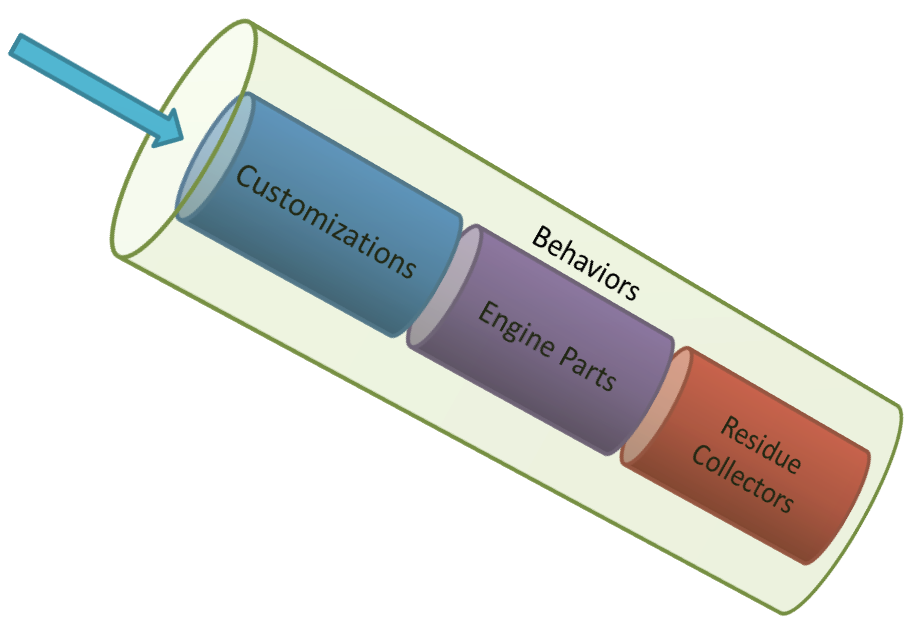
| Layer | Role |
|---|---|
| Behaviors | Decorators that wrap the whole pipeline — for example recursion guarding and tracing |
| Customizations | Your ISpecimenBuilder nodes; first match wins, before the default engine |
| Engine | Built-in specimen builders for primitives, collections, reflection-based construction, and auto-properties |
| Residue collectors | Fallback builders for requests the engine cannot satisfy — for example interfaces (AutoMoq mocks them here) |
A default Fixture starts with an empty Customizations collection. The middle engine block is wired in the constructor and handles well-known types such as int and string, plus complex types via reflection.
Customizations
Add ISpecimenBuilder instances to Customizations to intercept requests before the engine runs. The first builder that returns a specimen wins; the rest are skipped.
Register — replace creation for a type:
var fixture = new Fixture();
fixture.Register(() => new ClientDto { Name = "registered", Age = 30 });

var client = fixture.Create<ClientDto>();

Assert.Equal("registered", client.Name);
Customize — adjust how a type is built on every Create<T>():
var fixture = new Fixture();
fixture.Customize<ClientDto>(composer => composer.With(dto => dto.Age, 21));

var client = fixture.Create<ClientDto>();

Assert.Equal(21, client.Age);
Both Register and Customize append builders to fixture.Customizations. For reusable setup across tests, implement ICustomization and call fixture.Customize(new MyCustomization()).
Add a specimen builder manually — implement ISpecimenBuilder and append it when Register or Customize are not enough:
var fixture = new Fixture();
fixture.Customizations.Add(new FixedIntBuilder());

var value = fixture.Create<int>();

Assert.Equal(42, value);

public sealed class FixedIntBuilder : ISpecimenBuilder
{
    public object Create(object request, ISpecimenContext context)
    {
        if (request is not Type type || type != typeof(int))
        {
            return NoSpecimen.Instance;
        }

        return 42;
    }
}
Return NoSpecimen.Instance when your builder does not handle the request — the pipeline continues to the next builder. Any other return value (including null) satisfies the request.
See Customizations for FromFactory, Without, and other composer methods. For specification-gated builders, see Specimen builders and specifications.
Residue collectors
Some requests cannot be satisfied by the engine alone — for example an interface type has no public constructor. After the engine declines, builders in ResidueCollectors get a chance to handle those leftovers before AutoFixture throws.
Add a residue collector manually — same ISpecimenBuilder contract, but registered on ResidueCollectors so it runs only after the engine:
var fixture = new Fixture();
fixture.ResidueCollectors.Add(new InMemoryOrderRepositoryBuilder());

var repository = fixture.Create<IOrderRepository>();

Assert.IsType<InMemoryOrderRepository>(repository);

public sealed class InMemoryOrderRepositoryBuilder : ISpecimenBuilder
{
    public object Create(object request, ISpecimenContext context)
    {
        if (request is not Type type || type != typeof(IOrderRepository))
        {
            return NoSpecimen.Instance;
        }

        return new InMemoryOrderRepository();
    }
}
Residue collectors suit abstractions the engine cannot construct — interfaces, abstract classes, delegates. AutoMoq adds one that returns Moq mocks; you can add your own test doubles the same way.
Behaviors
A behavior is a decorator around the entire pipeline. It can observe or change requests and specimens going in and out. Recursion policies such as ThrowingRecursionBehavior and OmitOnRecursionBehavior are behaviors.
By default, circular graphs throw. Swap the throwing behavior for one that omits recursive properties:
var fixture = new Fixture();

fixture.Behaviors
    .OfType<ThrowingRecursionBehavior>()
    .ToList()
    .ForEach(b => fixture.Behaviors.Remove(b));
fixture.Behaviors.Add(new OmitOnRecursionBehavior());

var node = fixture.Create<TreeNode>();

Assert.NotNull(node);
Remove the default behavior before adding a replacement — behaviors stack as decorators, and the throwing policy runs first unless you remove it.
See Behaviors and Circular references for more policies and xUnit.net 3 attributes.
How a request is resolved
The kernel uses a chain of responsibility: many ISpecimenBuilder nodes in sequence; the first one that produces a specimen satisfies the request.
Requests
Every creation starts with ISpecimenBuilder.Create:
public interface ISpecimenBuilder
{
    object Create(object request, ISpecimenContext context);
}
A request can be any object. In the usual case it is a Type — Create<ClientDto>() eventually requests typeof(ClientDto). Building one object often triggers subsidiary requests for constructor parameters (ParameterInfo), properties (PropertyInfo), or custom request types.
Handling requests
Builders are typically grouped in a CompositeSpecimenBuilder. The composite asks each child in order until one returns a specimen.
null is a valid specimen. To decline a request, a builder must return NoSpecimen.Instance:
return NoSpecimen.Instance;
Any other return value — including null — ends the chain and becomes the result.
Specimen context
Create also receives an ISpecimenContext:
public interface ISpecimenContext
{
    object Resolve(object request);
}
A builder uses context.Resolve to create dependent specimens. For example, a constructor invoker resolves each ParameterInfo to get argument values, then invokes the constructor. Each Resolve call runs the full chain again for that sub-request — recursively, until the graph is complete.
Relays
A relay is an ISpecimenBuilder that handles one request by issuing a different request to the context and wrapping the result. ArrayRelay, for instance, handles array requests by resolving multiple element specimens and returning an array. Prefer relays over calling Activator.CreateInstance directly when extending the kernel.
Relating this to your tests
| What you do | Where it plugs in |
|---|---|
fixture.Create<T>() | Enters the pipeline with a type request |
fixture.Register(...) | Adds a customization builder |
fixture.Customize<T>(...) | Adds a typed composer builder to customizations |
fixture.Customize(new MyCustomization()) | Applies an ICustomization |
fixture.Customizations.Add(...) | Low-level — append any ISpecimenBuilder before the engine |
fixture.ResidueCollectors.Add(...) | Low-level — append a fallback builder after the engine |
fixture.Behaviors.Add(...) | Wraps the whole graph |
| AutoMoq customization | Adds builders to customizations and residue collectors for interfaces |
fixture.Build<T>() | One-off pipeline for a single specimen (bypasses fixture customizations) |
When Create fails or behaves unexpectedly, knowing this flow helps: check whether a customization intercepted the request, whether the engine could construct the type, or whether a behavior blocked recursion.